Skip to content
ConsoleMonster

Service browser

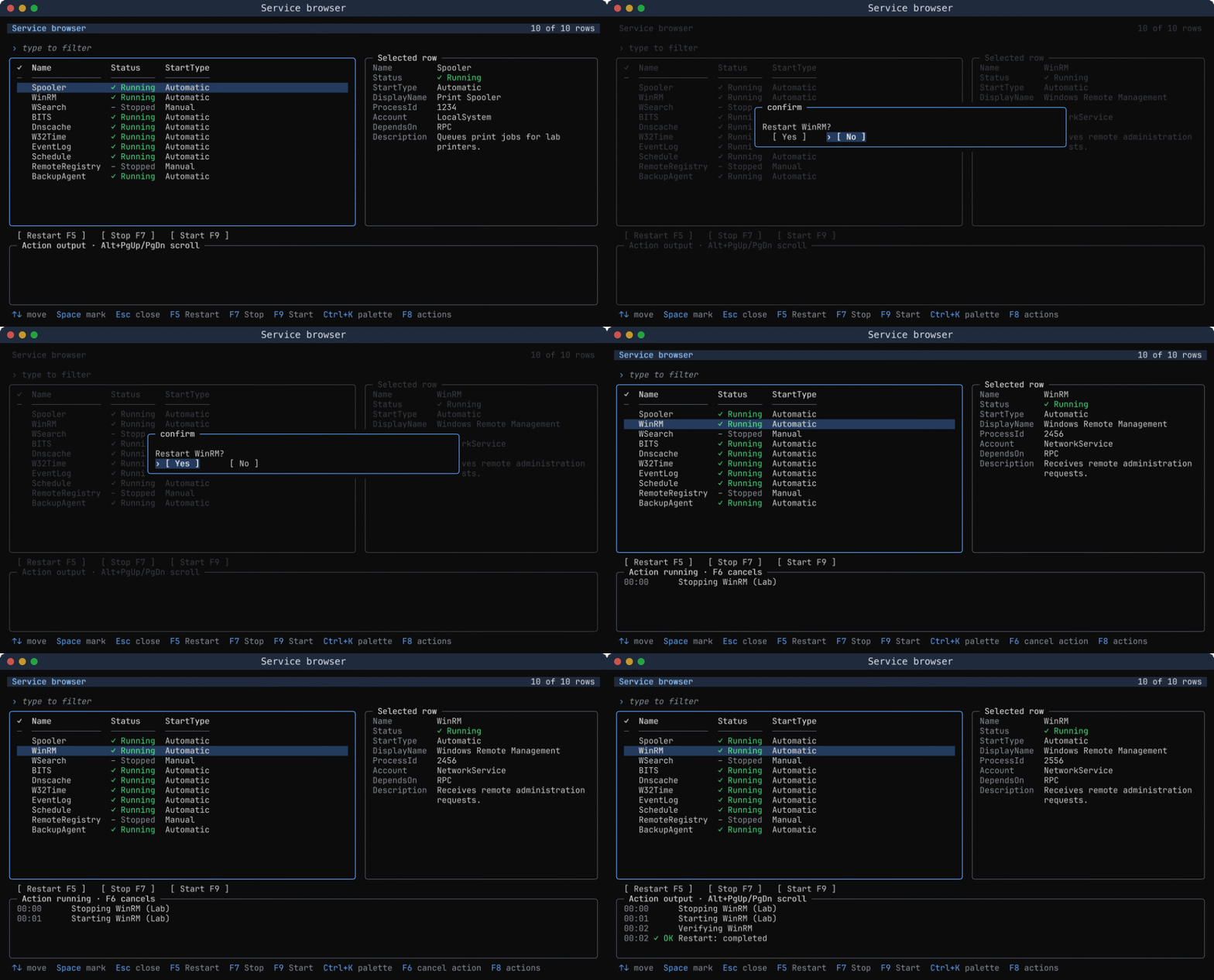
Browse service details, confirm an action and watch its output while the grid stays open.

Demos Terminal apps

Use it when an operator needs service details and confirmed actions without leaving the terminal app.

  • Live
  • 100×30
  • PowerShell 7.4+
  • .NET 8.0+
Service browser 100×3024-bitFull

How it's built

The whole program in one file, with its sample data at the top. It drew the recording above; both languages draw the same cells.

PowerShellservice-browser.ps1View on GitHub
# Browse fictional services; actions never change the local machine.
Import-Module -Name ConsoleMonster

# Data: explicit snapshots make the same demo portable across platforms.
$services = @(
    [pscustomobject] @{ Name = 'Spooler'; Status = 'Running'; StartType = 'Automatic'; DisplayName = 'Print Spooler'; ProcessId = 1234; Account = 'LocalSystem'; DependsOn = 'RPC'; Description = 'Queues print jobs for lab printers.' }
    [pscustomobject] @{ Name = 'WinRM'; Status = 'Running'; StartType = 'Automatic'; DisplayName = 'Windows Remote Management'; ProcessId = 2456; Account = 'NetworkService'; DependsOn = 'RPC'; Description = 'Receives remote administration requests.' }
    [pscustomobject] @{ Name = 'WSearch'; Status = 'Stopped'; StartType = 'Manual'; DisplayName = 'Windows Search'; ProcessId = 0; Account = 'LocalSystem'; DependsOn = 'RPC'; Description = 'Indexes lab documents for search.' }
    [pscustomobject] @{ Name = 'BITS'; Status = 'Running'; StartType = 'Automatic'; DisplayName = 'Background Transfer'; ProcessId = 3100; Account = 'LocalSystem'; DependsOn = 'RPC'; Description = 'Transfers deployment packages.' }
    [pscustomobject] @{ Name = 'Dnscache'; Status = 'Running'; StartType = 'Automatic'; DisplayName = 'DNS Client'; ProcessId = 3220; Account = 'NetworkService'; DependsOn = 'NSI'; Description = 'Caches DNS lookups.' }
    [pscustomobject] @{ Name = 'W32Time'; Status = 'Running'; StartType = 'Automatic'; DisplayName = 'Windows Time'; ProcessId = 3400; Account = 'LocalService'; DependsOn = 'RPC'; Description = 'Keeps lab clocks synchronized.' }
    [pscustomobject] @{ Name = 'EventLog'; Status = 'Running'; StartType = 'Automatic'; DisplayName = 'Windows Event Log'; ProcessId = 3500; Account = 'LocalService'; DependsOn = 'RPC'; Description = 'Collects service and security events.' }
    [pscustomobject] @{ Name = 'Schedule'; Status = 'Running'; StartType = 'Automatic'; DisplayName = 'Task Scheduler'; ProcessId = 3600; Account = 'LocalSystem'; DependsOn = 'RPC'; Description = 'Runs scheduled maintenance tasks.' }
    [pscustomobject] @{ Name = 'RemoteRegistry'; Status = 'Stopped'; StartType = 'Manual'; DisplayName = 'Remote Registry'; ProcessId = 0; Account = 'LocalService'; DependsOn = 'RPC'; Description = 'Allows approved remote configuration.' }
    [pscustomobject] @{ Name = 'BackupAgent'; Status = 'Running'; StartType = 'Automatic'; DisplayName = 'Lab Backup Agent'; ProcessId = 4120; Account = 'LabBackup'; DependsOn = 'RPC'; Description = 'Verifies nightly backup snapshots.' }
)

# Behaviour: explicit arguments enter isolated, cancellable action runspaces.
$actions = foreach ($definition in @(@('Restart', 'F5'), @('Stop', 'F7'), @('Start', 'F9'))) {
    New-ConsoleCommand -Key $definition[0] -Label $definition[0] -Shortcut $definition[1] `
        -ConfirmPrompt ($definition[0] + ' {Selection}?') -ArgumentList $definition[0], 'Lab' `
        -ImportModule Microsoft.PowerShell.Utility -ScriptBlock {
            param($Row, $Operation, $Environment)
            if ($Operation -eq 'Restart') {
                "Stopping $($Row.Name) ($Environment)"
                Start-Sleep -Milliseconds 1000
                "Starting $($Row.Name) ($Environment)"
            } else { "$Operation $($Row.Name) ($Environment)" }
            Start-Sleep -Milliseconds 1000
            "Verifying $($Row.Name)"
            Start-Sleep -Milliseconds 700
        }
}

# Layout: list, details, buttons, modal confirmation and streamed output.
$services | Show-ConsoleGrid -Title 'Service browser' -Property Name, Status, StartType, DisplayName, ProcessId, Account, DependsOn, Description `
    -Hide DisplayName, ProcessId, Account, DependsOn, Description -Action $actions `
    -Refresh {
        param($Row, $CommandKey)
        $Row.Status = if ($CommandKey -eq 'Stop') { 'Stopped' } else { 'Running' }
        $Row.ProcessId = if ($CommandKey -eq 'Stop') { 0 } else { $Row.ProcessId + 100 }
        $Row
    }
C#Program.csView on GitHub
using ConsoleMonster.Input;
using ConsoleMonster.Interactive;

// Data: the same fictional snapshots used by the PowerShell twin.
var services = new Grid("Service browser");
services.AddColumn("Name").AddColumn("Status").AddColumn("StartType").AddColumn("DisplayName").AddColumn("ProcessId").AddColumn("Account").AddColumn("DependsOn").AddColumn("Description");
var spooler = new { Name = "Spooler", Status = "Running", StartType = "Automatic", DisplayName = "Print Spooler", ProcessId = 1234, Account = "LocalSystem", DependsOn = "RPC", Description = "Queues print jobs for lab printers." };
services.AddRow(spooler, spooler.Name, spooler.Status, spooler.StartType, spooler.DisplayName, spooler.ProcessId, spooler.Account, spooler.DependsOn, spooler.Description);
var winrm = new { Name = "WinRM", Status = "Running", StartType = "Automatic", DisplayName = "Windows Remote Management", ProcessId = 2456, Account = "NetworkService", DependsOn = "RPC", Description = "Receives remote administration requests." };
services.AddRow(winrm, winrm.Name, winrm.Status, winrm.StartType, winrm.DisplayName, winrm.ProcessId, winrm.Account, winrm.DependsOn, winrm.Description);
var wsearch = new { Name = "WSearch", Status = "Stopped", StartType = "Manual", DisplayName = "Windows Search", ProcessId = 0, Account = "LocalSystem", DependsOn = "RPC", Description = "Indexes lab documents for search." };
services.AddRow(wsearch, wsearch.Name, wsearch.Status, wsearch.StartType, wsearch.DisplayName, wsearch.ProcessId, wsearch.Account, wsearch.DependsOn, wsearch.Description);
var bits = new { Name = "BITS", Status = "Running", StartType = "Automatic", DisplayName = "Background Transfer", ProcessId = 3100, Account = "LocalSystem", DependsOn = "RPC", Description = "Transfers deployment packages." };
services.AddRow(bits, bits.Name, bits.Status, bits.StartType, bits.DisplayName, bits.ProcessId, bits.Account, bits.DependsOn, bits.Description);
var dnscache = new { Name = "Dnscache", Status = "Running", StartType = "Automatic", DisplayName = "DNS Client", ProcessId = 3220, Account = "NetworkService", DependsOn = "NSI", Description = "Caches DNS lookups." };
services.AddRow(dnscache, dnscache.Name, dnscache.Status, dnscache.StartType, dnscache.DisplayName, dnscache.ProcessId, dnscache.Account, dnscache.DependsOn, dnscache.Description);
var w32time = new { Name = "W32Time", Status = "Running", StartType = "Automatic", DisplayName = "Windows Time", ProcessId = 3400, Account = "LocalService", DependsOn = "RPC", Description = "Keeps lab clocks synchronized." };
services.AddRow(w32time, w32time.Name, w32time.Status, w32time.StartType, w32time.DisplayName, w32time.ProcessId, w32time.Account, w32time.DependsOn, w32time.Description);
var eventlog = new { Name = "EventLog", Status = "Running", StartType = "Automatic", DisplayName = "Windows Event Log", ProcessId = 3500, Account = "LocalService", DependsOn = "RPC", Description = "Collects service and security events." };
services.AddRow(eventlog, eventlog.Name, eventlog.Status, eventlog.StartType, eventlog.DisplayName, eventlog.ProcessId, eventlog.Account, eventlog.DependsOn, eventlog.Description);
var schedule = new { Name = "Schedule", Status = "Running", StartType = "Automatic", DisplayName = "Task Scheduler", ProcessId = 3600, Account = "LocalSystem", DependsOn = "RPC", Description = "Runs scheduled maintenance tasks." };
services.AddRow(schedule, schedule.Name, schedule.Status, schedule.StartType, schedule.DisplayName, schedule.ProcessId, schedule.Account, schedule.DependsOn, schedule.Description);
var remoteregistry = new { Name = "RemoteRegistry", Status = "Stopped", StartType = "Manual", DisplayName = "Remote Registry", ProcessId = 0, Account = "LocalService", DependsOn = "RPC", Description = "Allows approved remote configuration." };
services.AddRow(remoteregistry, remoteregistry.Name, remoteregistry.Status, remoteregistry.StartType, remoteregistry.DisplayName, remoteregistry.ProcessId, remoteregistry.Account, remoteregistry.DependsOn, remoteregistry.Description);
var backupagent = new { Name = "BackupAgent", Status = "Running", StartType = "Automatic", DisplayName = "Lab Backup Agent", ProcessId = 4120, Account = "LabBackup", DependsOn = "RPC", Description = "Verifies nightly backup snapshots." };
services.AddRow(backupagent, backupagent.Name, backupagent.Status, backupagent.StartType, backupagent.DisplayName, backupagent.ProcessId, backupagent.Account, backupagent.DependsOn, backupagent.Description);

// Behaviour: asynchronous commands receive captured snapshots and cancellation.
var options = new GridOptions();
foreach (string field in new[] { "DisplayName", "ProcessId", "Account", "DependsOn", "Description" }) { options.HiddenColumns.Add(field); }
foreach (var definition in new[] { ("Restart", System.ConsoleKey.F5), ("Stop", System.ConsoleKey.F7), ("Start", System.ConsoleKey.F9) }) {
    string operation = definition.Item1;
    options.Commands.Add(new AppCommand(operation, operation, async (context, cancellation) => {
        foreach (object? row in context.Rows) {
            var type = row!.GetType();
            string name = type.GetProperty("Name")!.GetValue(row)?.ToString() ?? "";
            if (operation == "Restart") {
                context.Write($"Stopping {name} (Lab)");
                await Task.Delay(1000, cancellation);
                context.Write($"Starting {name} (Lab)");
            } else { context.Write($"{operation} {name} (Lab)"); }
            await Task.Delay(1000, cancellation);
            context.Write($"Verifying {name}");
            await Task.Delay(700, cancellation);
        }
    }) { Shortcut = new KeyChord(definition.Item2), ConfirmPrompt = operation + " {Selection}?" });
}

// Refresh the acted-on snapshot on the input thread, preserving selection and row position.
options.RefreshRow = (command, row) => {
    var values = row.Values.ToArray();
    string status = command.Key == "Stop" ? "Stopped" : "Running";
    values[1] = status;
    values[4] = command.Key == "Stop" ? 0 : Convert.ToInt32(values[4]) + 100;
    var item = new { Name = values[0], Status = status };
    return new GridRow(item, values);
};

// Layout: the shared host owns details, confirmation, output and terminal lifetime.
services.Show(options);
Run it yourself

Three steps in PowerShell, four in C#. Every command copies with one click.

  1. Install the module

    Once. Windows PowerShell 5.1 or PowerShell 7 on Windows, macOS or Linux.

    Install-Module ConsoleMonster -Scope CurrentUser
  2. Save the program

    Download it, or copy it from above into service-browser.ps1.

  3. Run it

    From the folder you saved it in.

    ./service-browser.ps1
  1. Create a project

    A plain console app; .NET 8 or later.

    dotnet new console -n Servicebrowser; cd Servicebrowser
  2. Add ConsoleMonster

    The only package the program needs.

    dotnet add package ConsoleMonster
  3. Replace Program.cs

    Download it, or copy the program from above.

  4. Run it

    dotnet run

Or skip the copying. Every demo ships with the module and the project template.

Show-ConsoleDemo service-browser
Export-ConsoleDemo service-browser -Path ./service-browser.ps1
dotnet new install ConsoleMonster.Templates
dotnet new consolemonster --demo service-browser -n Servicebrowser

Make it yours

Start with these, then read the rest of the file.

  1. Replace the fictional rows with Get-Service snapshots.

  2. Replace the simulated action with Restart-Service in an explicitly imported management module.

  3. Add a command with its own key, shortcut and confirmation prompt.

Use it in a talk

The same recording as files your slides can play. GIF plays in PowerPoint, Keynote and Google Slides without an external encoder.

  • Paced GIF A full-screen recording with confirmation and streamed output.
  • HTML player The same recording with chapters, scrubbing and playback speed.

More terminal apps

All demos