Show-ConsoleImage prints an image at the size you ask for in cells and keeps its aspect ratio. It reads PNG, JPEG, GIF (the first frame), BMP, TIFF and PPM. To try it, download the sample requests-chart.png:
Show-ConsoleImage -Path ./requests-chart.png -Width 56
Preview every screenshot in a folder:
Get-ChildItem ./screens -Filter *.png | Show-ConsoleImage -Height 12
What each terminal gets
| Terminal | Detected by | Drawn with |
|---|---|---|
| Kitty, Ghostty | TERM=xterm-kitty, KITTY_WINDOW_ID, TERM_PROGRAM=ghostty | Kitty graphics |
| iTerm2, WezTerm | TERM_PROGRAM, or LC_TERMINAL=iTerm2, which SSH forwards | iTerm2 inline images |
| Windows Terminal 1.22 or later | WT_SESSION | Sixel |
| Other terminals with 256 colours or more, VS Code, tmux, screen and Zellij | Half blocks | |
| Redirected, CI, 16-colour and no-colour output, jobs, remoting and transcripts | [image: name WxH] |
Get-ConsoleCapability shows the result in ImageProtocol, and the reason in the images: line of Decisions:
Get-ConsoleCapability | Select-Object ImageProtocol
(Get-ConsoleCapability).Decisions | Where-Object { $_ -like 'images:*' }
Half blocks give every cell two pixels: the upper one in the foreground colour of ▀, the lower one in the background colour. Thin chart lines keep their colour instead of fading into the background.
▀▀▀▀▀▀▀▀▀▀▀▀▀▀▀▀▀▀▀▀▀▀▀▀▀▀▀▀▀▀▀▀▀▀▀▀▀▀▀▀▀▀▀▀▀▀▀▀▀▀▀▀▀▀▀▀
██▀▀▀▀▀▀▀▀▀▀▀▀▀▀▀███████████████████████████████████████
████▀▀███▀█▀████████████████████████████████████████████
██▀▀▀▀██▀▀▀▀████████████████████████████████████████████
█████▀██████████████████████████████████████████████████
██▀▀█████████████████████▀▀▀▀▀▀▀▀▀▀▀▀███████████████████
██▀▀▀▀▀▀▀▀▀▀▀▀▀▀▀▀▀▀▀▀▀▀▀▀▀▀▀▀▀▀▀▀▀▀▀▀▀▀▀▀▀▀▀▀▀▀▀▀▀▀▀███
███████▀▀▀▀▀▀██▀▀▀▀▀▀▀▀▀▀▀▀▀▀▀▀▀▀▀▀▀▀▀▀▀▀▀██████████████
██▀▀▀▀▀▀▀▀▀▀▀▀▀▀▀▀▀▀▀▀▀▀▀▀▀▀▀▀▀▀▀▀▀▀▀▀▀▀▀▀▀▀▀▀▀▀▀▀▀▀▀███
███▀█▀▀▀▀▀▀▀▀▀███████████████████████████▀▀▀▀▀▀▀▀▀▀▀▀███
█████████████████████████████████████████████▀▀▀▀▀▀▀▀███
███▀▀▀▀▀▀▀▀▀▀▀▀▀▀▀▀▀▀▀▀▀▀▀▀▀▀▀▀▀▀▀▀▀▀▀▀▀▀▀▀▀▀▀▀▀▀▀▀▀▀███
████▀▀▀█████▀▀▀████▀▀▀▀████▀▀▀██████▀▀█████▀▀▀█████▀▀███
▀▀▀▀▀▀▀▀▀▀▀▀▀▀▀▀▀▀▀▀▀▀▀▀▀▀▀▀▀▀▀▀▀▀▀▀▀▀▀▀▀▀▀▀▀▀▀▀▀▀▀▀▀▀▀▀
▀▀▀▀▀▀▀▀▀▀▀▀▀▀▀▀▀▀▀▀▀▀▀▀▀▀▀▀▀▀▀▀▀▀▀▀▀▀▀▀▀▀▀▀▀▀▀▀▀▀▀▀▀▀▀▀
██▀▀▀▀▀▀▀▀▀▀▀▀▀▀▀███████████████████████████████████████
████▀▀███▀█▀████████████████████████████████████████████
██▀▀▀▀██▀▀▀▀████████████████████████████████████████████
█████▀██████████████████████████████████████████████████
██▀▀█████████████████████▀▀▀▀▀▀▀▀▀▀▀▀███████████████████
██▀▀▀▀▀▀▀▀▀▀▀▀▀▀▀▀▀▀▀▀▀▀▀▀▀▀▀▀▀▀▀▀▀▀▀▀▀▀▀▀▀▀▀▀▀▀▀▀▀▀▀███
███████▀▀▀▀▀▀██▀▀▀▀▀▀▀▀▀▀▀▀▀▀▀▀▀▀▀▀▀▀▀▀▀▀▀██████████████
██▀▀▀▀▀▀▀▀▀▀▀▀▀▀▀▀▀▀▀▀▀▀▀▀▀▀▀▀▀▀▀▀▀▀▀▀▀▀▀▀▀▀▀▀▀▀▀▀▀▀▀███
███▀█▀▀▀▀▀▀▀▀▀███████████████████████████▀▀▀▀▀▀▀▀▀▀▀▀███
█████████████████████████████████████████████▀▀▀▀▀▀▀▀███
███▀▀▀▀▀▀▀▀▀▀▀▀▀▀▀▀▀▀▀▀▀▀▀▀▀▀▀▀▀▀▀▀▀▀▀▀▀▀▀▀▀▀▀▀▀▀▀▀▀▀███
████▀▀▀█████▀▀▀████▀▀▀▀████▀▀▀██████▀▀█████▀▀▀█████▀▀███
▀▀▀▀▀▀▀▀▀▀▀▀▀▀▀▀▀▀▀▀▀▀▀▀▀▀▀▀▀▀▀▀▀▀▀▀▀▀▀▀▀▀▀▀▀▀▀▀▀▀▀▀▀▀▀▀
Show-ConsoleImage -Path ./requests-chart.png -Width 56 -Protocol HalfBlockFull program
Show-ConsoleImage -Path ./requests-chart.png -Width 56 -Protocol HalfBlock▀▀▀▀▀▀▀▀▀▀▀▀▀▀▀▀▀▀▀▀▀▀▀▀▀▀▀▀▀▀▀▀▀▀▀▀▀▀▀▀▀▀▀▀▀▀▀▀▀▀▀▀▀▀▀▀ ██▀▀▀▀▀▀▀▀▀▀▀▀▀▀▀███████████████████████████████████████ ████▀▀███▀█▀████████████████████████████████████████████ ██▀▀▀▀██▀▀▀▀████████████████████████████████████████████ █████▀██████████████████████████████████████████████████ ██▀▀█████████████████████▀▀▀▀▀▀▀▀▀▀▀▀███████████████████ ██▀▀▀▀▀▀▀▀▀▀▀▀▀▀▀▀▀▀▀▀▀▀▀▀▀▀▀▀▀▀▀▀▀▀▀▀▀▀▀▀▀▀▀▀▀▀▀▀▀▀▀███ ███████▀▀▀▀▀▀██▀▀▀▀▀▀▀▀▀▀▀▀▀▀▀▀▀▀▀▀▀▀▀▀▀▀▀██████████████ ██▀▀▀▀▀▀▀▀▀▀▀▀▀▀▀▀▀▀▀▀▀▀▀▀▀▀▀▀▀▀▀▀▀▀▀▀▀▀▀▀▀▀▀▀▀▀▀▀▀▀▀███ ███▀█▀▀▀▀▀▀▀▀▀███████████████████████████▀▀▀▀▀▀▀▀▀▀▀▀███ █████████████████████████████████████████████▀▀▀▀▀▀▀▀███ ███▀▀▀▀▀▀▀▀▀▀▀▀▀▀▀▀▀▀▀▀▀▀▀▀▀▀▀▀▀▀▀▀▀▀▀▀▀▀▀▀▀▀▀▀▀▀▀▀▀▀███ ████▀▀▀█████▀▀▀████▀▀▀▀████▀▀▀██████▀▀█████▀▀▀█████▀▀███ ▀▀▀▀▀▀▀▀▀▀▀▀▀▀▀▀▀▀▀▀▀▀▀▀▀▀▀▀▀▀▀▀▀▀▀▀▀▀▀▀▀▀▀▀▀▀▀▀▀▀▀▀▀▀▀▀
▀▀▀▀▀▀▀▀▀▀▀▀▀▀▀▀▀▀▀▀▀▀▀▀▀▀▀▀▀▀▀▀▀▀▀▀▀▀▀▀▀▀▀▀▀▀▀▀▀▀▀▀▀▀▀▀
██▀▀▀▀▀▀▀▀▀▀▀▀▀▀▀███████████████████████████████████████
████▀▀███▀█▀████████████████████████████████████████████
██▀▀▀▀██▀▀▀▀████████████████████████████████████████████
█████▀██████████████████████████████████████████████████
██▀▀█████████████████████▀▀▀▀▀▀▀▀▀▀▀▀███████████████████
██▀▀▀▀▀▀▀▀▀▀▀▀▀▀▀▀▀▀▀▀▀▀▀▀▀▀▀▀▀▀▀▀▀▀▀▀▀▀▀▀▀▀▀▀▀▀▀▀▀▀▀███
███████▀▀▀▀▀▀██▀▀▀▀▀▀▀▀▀▀▀▀▀▀▀▀▀▀▀▀▀▀▀▀▀▀▀██████████████
██▀▀▀▀▀▀▀▀▀▀▀▀▀▀▀▀▀▀▀▀▀▀▀▀▀▀▀▀▀▀▀▀▀▀▀▀▀▀▀▀▀▀▀▀▀▀▀▀▀▀▀███
███▀█▀▀▀▀▀▀▀▀▀███████████████████████████▀▀▀▀▀▀▀▀▀▀▀▀███
█████████████████████████████████████████████▀▀▀▀▀▀▀▀███
███▀▀▀▀▀▀▀▀▀▀▀▀▀▀▀▀▀▀▀▀▀▀▀▀▀▀▀▀▀▀▀▀▀▀▀▀▀▀▀▀▀▀▀▀▀▀▀▀▀▀███
████▀▀▀█████▀▀▀████▀▀▀▀████▀▀▀██████▀▀█████▀▀▀█████▀▀███
▀▀▀▀▀▀▀▀▀▀▀▀▀▀▀▀▀▀▀▀▀▀▀▀▀▀▀▀▀▀▀▀▀▀▀▀▀▀▀▀▀▀▀▀▀▀▀▀▀▀▀▀▀▀▀▀
Show-ConsoleImage -Path ./requests-chart.png -Width 56 -Protocol HalfBlockFull program
Show-ConsoleImage -Path ./requests-chart.png -Width 56 -Protocol HalfBlockRedirected output, CI logs and NO_COLOR get one line, so logs stay readable and never carry image sequences:
[image: requests-chart.png 560x272]
[image: requests-chart.png 560x272]
Show-ConsoleImage -Path ./requests-chart.png -Width 56 -Protocol NoneFull program
Show-ConsoleImage -Path ./requests-chart.png -Width 56 -Protocol NoneKitty, iTerm2 and Sixel draw the image itself rather than text, so there is no terminal frame to show for them. This is the image they receive, scaled by the terminal to the same 56 columns:
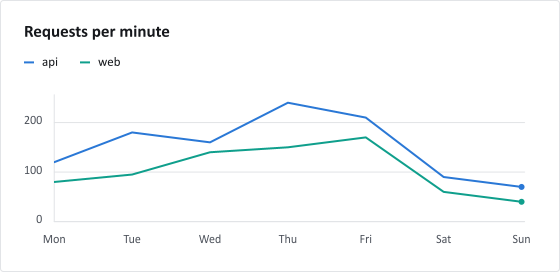
Choose the protocol
When your terminal supports a protocol that isn't detected, or a connection drops image sequences, choose it with -Protocol. Redirected and CI output keep the placeholder whatever you choose.
Show-ConsoleImage -Path ./requests-chart.png -Protocol Kitty
Show-ConsoleImage -Path ./requests-chart.png -Width 40 -Protocol HalfBlock
Size
- Without
-Widthor-Height, the image takes one cell per 10 pixels, up to the window width. - With
-Width, the rows follow the aspect ratio; a cell is about twice as tall as it is wide. - With both, the image fits inside that box.
- Kitty, iTerm2 and Sixel images stay on screen: they are at most one row shorter than the window.
Kitty and iTerm2 receive the PNG as it is, or shrunk when it has more than twice the pixels the cells can show, and scale it to the cells, keeping its aspect ratio. Sixel is drawn at its pixel size, so it is rendered at 10 pixels per column on the 10×20-pixel cell Windows Terminal lays sixels out on, with up to 256 colours. A terminal with another sixel cell size draws it larger or smaller.
Inside panels and dashboards
New-ConsoleImage creates the same image as a widget for panels, columns, dashboards and apps:
New-ConsoleColumns -Content {
    New-ConsolePanel -Title 'Requests' -Content { New-ConsoleImage -Path ./requests-chart.png -Width 40 }
    New-ConsolePanel -Title 'Summary' -Content {
        New-ConsoleKeyValue -InputObject ([ordered] @{ Peak = '240/min'; Quietest = 'Sunday' })
    }
} | Show-Console
Inside layouts and live regions the image is always drawn with half blocks, or as the placeholder:
- A live frame only rewrites the cells that changed, so an unchanged image writes nothing on refresh, and a changed one never leaves pieces behind.
- The image is resampled once per size, not on every frame.
- Kitty, iTerm2 and Sixel pixels are print-once only. They aren't cells, so a redraw would paint over them or leave them behind when the screen scrolls.
- While a live session owns the console,
Show-ConsoleImagewrites above it with half blocks.
In C#
ConsoleImage lives in the ConsoleMonster.Graphics add-on; the core package stays dependency-free.
using ConsoleMonster;
using ConsoleMonster.Capabilities;
using ConsoleMonster.Graphics;
using ConsoleMonster.Layout;

ConsoleImage image = ConsoleImage.FromFile("requests-chart.png");
image.Width = 56;
image.Write();

// A chart rendered to PNG in memory, with a protocol chosen for an undetected terminal.
byte[] png = File.ReadAllBytes("requests-chart.png");
new ConsoleImage(png, "requests") { Width = 40 }.Write(Terminal.GetCurrentProfile().WithImageProtocol(ImageProtocol.Kitty));

// Inside a layout: half blocks, like every other widget.
Terminal.Write(new Panel(new ConsoleImage(png) { Width = 40 }, "Requests"));
ConsoleImage also accepts a ChartForgeX RgbaImage, so a chart or diagram can go straight from its renderer to the terminal.
Not supported yet
- Real pixels inside layouts and live regions; they use half blocks there.
- tmux, screen and Zellij passthrough; images under them use half blocks.
- Animation: a GIF shows its first frame.
- Detection over SSH relies on the environment.
TERMandLC_TERMINALare forwarded,WT_SESSIONandTERM_PROGRAMusually aren't; use-Protocolthere. - Windows Terminal before 1.22 has no Sixel and leaves the rows empty; use
-Protocol HalfBlockthere. - An image starts on a new line: after
Write-Host -NoNewline, end the line first.